FireShot - Full webpage screenshot tool support forum / FireShot Browser Extension / Public Support
The storage size has exceeded its quota error message
Pages: 1
| Posted: 22 May 2026 12:31 | ||
|
Registered User |
Posts: 13 Join Date: Nov 2025 |
|
|
Hi there,
My fireshot suddenly stopped capturing pages in Firefox a few days ago so I deleted it and downloaded the latest version. Now it works but I keep getting an error message every time I do a screenshot saying "storage size has exceeded its quota" There is nothing to delete as there is nothing in the drop down box. How do I get rid of this error message? Firefox version 151.0.1 Fireshot version v.2.1.4.15 |
||
| Posted: 22 May 2026 15:55 | ||

|
Administrator Currently Offline |
Posts: 4659 Join Date: Jan 2007 |
|
It seems like the indexedDB is corrupt.
The first thing I recommend is to remove the extension, then install it again. I this doesn't help, please try the following: - Open FireShot Options page. - Press F12 to open the Developer Tools.Storage Tab: - Click the Storage tab at the top. - Delete Data: Click IndexedDB on the left. Locate FireShotDB, right-cilck it and select Delete FireShot DB. - Restart Firefox. __________________ FireShot Pro Pro Full Webpage Screenshots will be moving to a subscription model soon!
Last chance to purchase a Lifetime License and get a 33% discount! - https://getfireshot.com/buy.php |
||
| Posted: 22 May 2026 16:09 | ||
|
Registered User |
Posts: 13 Join Date: Nov 2025 |
|
|
I found Fireshot options but then when Im in there I press F12 and it doesnt seem to do anything. So I cant find the Developer Tools/Storage tab to continue trying to fix issue
Are you able to show me a screen shot so I can see where this is? Thanks |
||
| Posted: 22 May 2026 21:07 | ||
|
Registered User |
Posts: 13 Join Date: Nov 2025 |
|
|
Hi again,
I found out where to go. F12 doesnt work for me for some reason but when I right clicked once Im in Fireshot Options it says Inspect so I went into that and the Developer Tools came up. I found the Storage tab and then scrolled down to IndexedDB but all thats in there is something that says moz/extension://and many numbers and it wont let me delete that and in the box to the right it says no data present for select host |
||
| Posted: 22 May 2026 21:30 Last Edited By: JK | ||
|
|
Administrator Currently Offline |
Posts: 4659 Join Date: Jan 2007 |
|
So, just to confirm, removing the extension completely and installing it from scratch doesn't not solve this problem? __________________ FireShot Pro Pro Full Webpage Screenshots will be moving to a subscription model soon!
Last chance to purchase a Lifetime License and get a 33% discount! - https://getfireshot.com/buy.php |
||
| Posted: 22 May 2026 21:53 | ||
|
Registered User |
Posts: 13 Join Date: Nov 2025 |
|
|
I tried uninstalling it by right clicking on Fireshot and selecting remove extension and it was gone and then I re installed it from your link on here with current version but still getting that issue with the storage quota.
Whats weird is last year I had this same issue and uninstalling it and re installing worked but not this time. |
||
| Posted: 24 May 2026 19:26 | ||
|
|
Administrator Currently Offline |
Posts: 4659 Join Date: Jan 2007 |
|
Kitty, is creating a new profile in Firefox a viable option for you? __________________ FireShot Pro Pro Full Webpage Screenshots will be moving to a subscription model soon!
Last chance to purchase a Lifetime License and get a 33% discount! - https://getfireshot.com/buy.php |
||
| Posted: 25 May 2026 11:55 | ||
|
Registered User |
Posts: 13 Join Date: Nov 2025 |
|
|
Ive tried uninstalling it from the firefox browser and also going into Windows settings/apps and uninstalling it from there and then re installing the latest version which is now 2.1.4.17 and Im still getting that page that pops up saying Ive exceeded storage quota and it interferes with me trying to do a screen shot.
What do you mean create a new profile in Firefox? I dont think I have a profile on Firefox. What can I do to fix this. Its really frustrating. |
||
| Posted: 26 May 2026 14:48 Last Edited By: JK | ||
|
|
Administrator Currently Offline |
Posts: 4659 Join Date: Jan 2007 |
Hi Kitty. Just to make sure - don't you have this option enabled. If you do, please disable it and check:
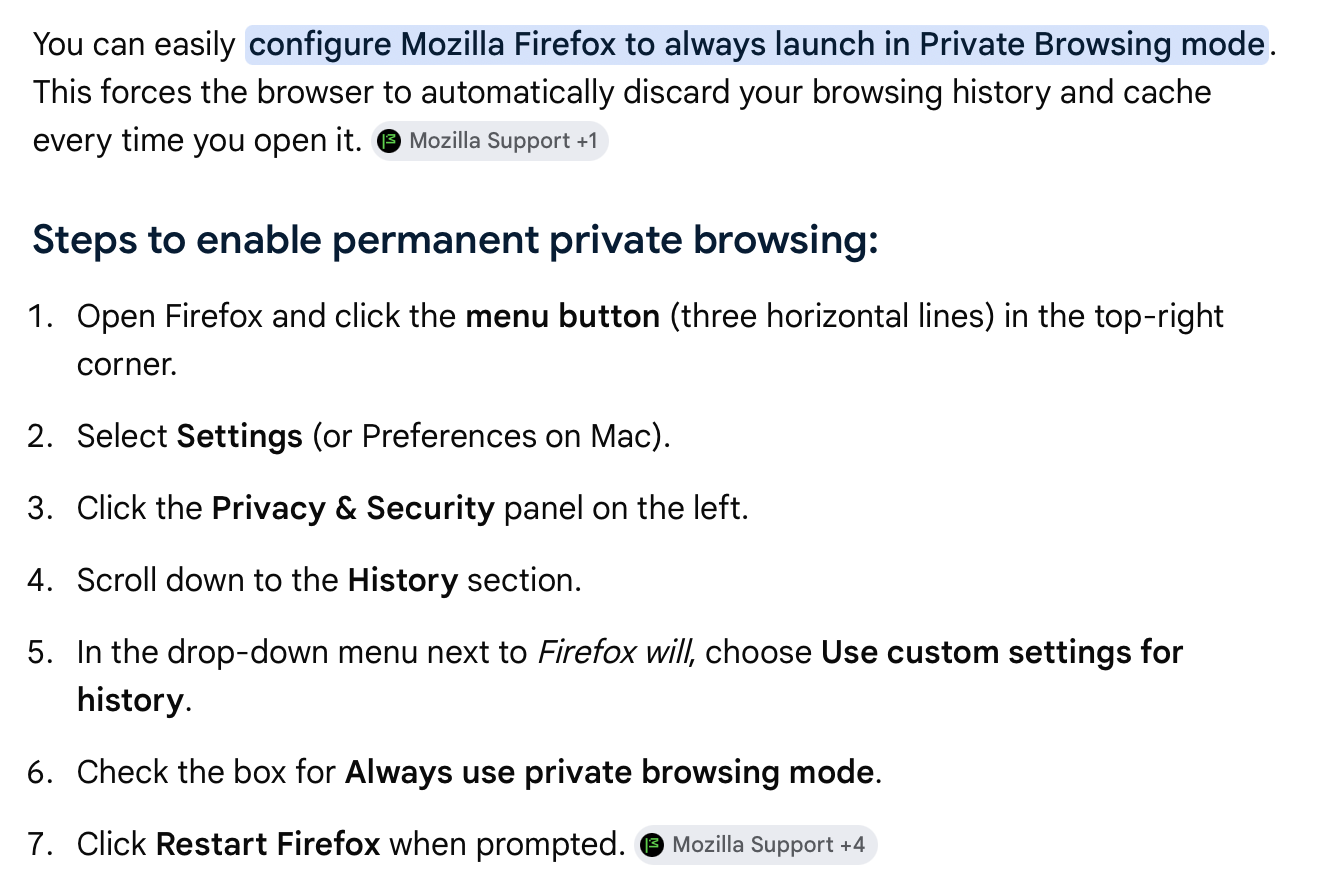 __________________ FireShot Pro Pro Full Webpage Screenshots will be moving to a subscription model soon!
Last chance to purchase a Lifetime License and get a 33% discount! - https://getfireshot.com/buy.php |
||
| Posted: 26 May 2026 15:13 | ||
|
Registered User |
Posts: 13 Join Date: Nov 2025 |
|
|
Hi,
I dont have private browsing enabled. None of my history gets saved on this computer. Not sure what else to do to fix this issue |
||
| Posted: 26 May 2026 18:56 | ||
|
|
Administrator Currently Offline |
Posts: 4659 Join Date: Jan 2007 |
|
Can you please try creating a new profile and installing FireShot on it to check whether it problem is caused by a corrupted profile or not?
https://support.mozilla.org/en-US/kb/profile-manager-create-remove-switch-firefox-profiles __________________ FireShot Pro Pro Full Webpage Screenshots will be moving to a subscription model soon!
Last chance to purchase a Lifetime License and get a 33% discount! - https://getfireshot.com/buy.php |
||
| Posted: 28 May 2026 21:40 | ||
|
Registered User |
Posts: 13 Join Date: Nov 2025 |
|
|
I just made a new profile on firefox to test and the fireshot worked and did not have that storage quota page come up. So doing this worked but I want to use my main profile which has all my bookmarks etc...saved.
Okay so based on this what do I do now? Something is not working in the one that I currently use. Thanks |
||
| Posted: 28 May 2026 22:11 | ||
|
Registered User |
Posts: 13 Join Date: Nov 2025 |
|
|
I got it! Everything works now in my original profile. It was in private browsing mode afterall. I didnt want it to save my history ever on this computer so that automatically made me in private browsing mode I guess. I took it off private browsing and now it saves my history but at least Fireshot works.
Thanks for your help! |
||
| Posted: 28 May 2026 23:39 | ||
|
|
Administrator Currently Offline |
Posts: 4659 Join Date: Jan 2007 |
|
Thanks Kitty for your update. Like I suspected, the problem was relevant to the Private mode. We'll look into this issue to find a solution.
I'm glad to see it resolved. The old trick to start clean and then compare differences worked perfectly. __________________ FireShot Pro Pro Full Webpage Screenshots will be moving to a subscription model soon!
Last chance to purchase a Lifetime License and get a 33% discount! - https://getfireshot.com/buy.php |
||
Pages: 1